Choosing the right laptop can be confusing—especially with so many brands, specs, and price ranges available. Whether you’re a student, gamer, or professional, this laptop buying guide will help you make the perfect choice without wasting money.
Key Specifications
Best Options
Choosing the right laptop can be confusing—this guide simplifies everything.
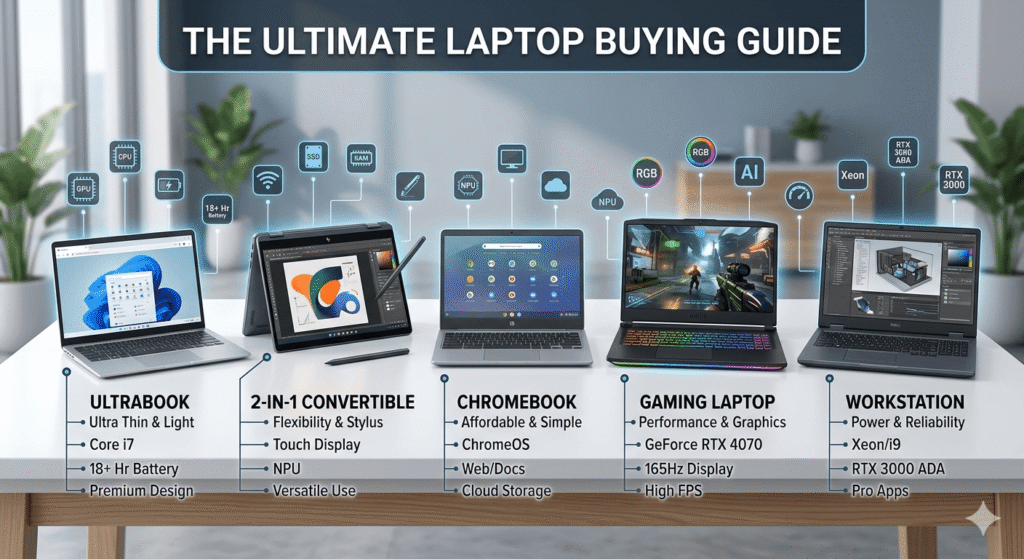
Types of Laptops
Understanding the different types of laptops is the first step:
Everyday / Budget Laptops
Perfect for basic tasks like browsing, streaming, and MS Office.
- Ideal for students and home users
- Affordable and lightweight
Ultrabooks
Slim, stylish, and powerful.
- Great battery life
- Premium build quality
- Best for professionals on the go
Gaming Laptops
Built for performance and graphics-heavy tasks.
- Dedicated GPU
- High refresh rate displays
- Ideal for gamers and creators
2-in-1 Convertible Laptops
Laptop + tablet in one device.
- Touchscreen & flexible design
- Good for note-taking and travel
Workstations
High-end machines for heavy software.
- Used by engineers, designers, and developers
- Expensive but extremely powerful
Chromebooks
Lightweight laptops running Chrome OS, designed for web-based tasks.
- Fast boot times and simple interface
- Excellent battery life
- Great for students, casual users, and anyone relying on cloud apps
Key Laptop Specifications to Consider
Before buying, focus on these essential specs:
Processor (CPU)
The brain of your laptop.
- Intel Core i3/i5/i7/i9
- AMD Ryzen 3/5/7/9
( 👉 For most users: Intel i5 or Ryzen 5 is ideal)
RAM
Determines multitasking performance.
- 8GB: Basic use
- 16GB: Recommended for most users
- 32GB+: Heavy tasks
Storage
Where your files and programs live.
- SSD (Solid State Drive) → Fast (recommended)
- HDD → Cheaper but slower
( 👉 Go for at least 512GB SSD)
Graphics (GPU)
Handles visuals, games, and creative work.
- Integrated: Good for browsing, streaming, and office tasks
- Dedicated: Gaming & editing, Essential for gaming, video editing, 3D software
Battery Life
Keeps you powered on the go.
- Everyday use → 6–8 hours minimum
- Ultrabooks/Chromebooks → 10–12 hours
- Gaming laptops → Usually shorter due to powerful hardware
- Always check real-world battery tests
Display
Determines multitasking performance.
- Full HD (1920×1080) minimum
- 120Hz+ for gaming
- IPS panel for better colors
Bounce – 👉 For gamers/creators: NVIDIA GeForce or AMD Radeon
Best Laptop Options (2026)
Here are some top picks based on different needs:
Best Budget Laptop
- Reliable performance
- Good for students
- Affordable pricing
Best Laptop for Students
Determines multitasking performance.
- 8GB: Basic use
- 16GB: Recommended for most users
- 32GB+: Heavy tasks
Best Gaming Laptop
- High-end GPU
- Fast refresh display
- Strong cooling system
💼 Best Laptop for Professionals
- Premium build
- Powerful CPU
- Long battery life
💡 Tips to Choose the Right Laptop
✔️ Set a clear budget
✔️ Choose SSD over HDD
✔️ Don’t overspend on specs you won’t use
✔️ Check reviews before buying
✔️ Prefer trusted brands